 RSS 2.0
Dynamics CRM 4.0 で、リレーションが親子関係の場合、親エンティティレコードの削除操作を子エンティティレコードに波及させることができます。ただし、状態はできません。結構必要な機能な気がしますがたぶんうまい方法はないと思います。ただし部署の場合は親部署を無効化すると子部署が無効化されます。っていうか部署の場合は削除できないんですが。
今回作成したプログラムは Windows Server 2008 上に構築した Dynamics CRM 4.0 Update Rollup 10 に対して実施しています。
あんまり細かくテストしていませんが。ワークフローアクティビティを作成するためのdll参照設定などは[DynamicsCRM] カスタムアクティビティを Crm のワークフローで使用する を参照してください。
1. カスタムアクティビティ
今回作成するプログラムは、親レコードの状態を関連名で指定した関連の子レコードへ反映させることができます。明示的に子レコードの状態を指定することもできます。プログラムの内容を確認すればわかりますが、本プログラムは親エンティティレコードの状態を子エンティティレコードに伝搬させるアクティビティです。CascadeStateActivityは親から状態を伝搬させるだけでなく、State にActiveやInactive指定することで、親レコードの状態とは関係なしに関連名で指定された子レコードの状態を変更させることもできます。
using System;
using System.Collections.Generic;
using System.Linq;
using System.Text;
using System.Workflow.ComponentModel;
using Microsoft.Crm.Workflow;
using Microsoft.Crm.Sdk;
using Microsoft.Crm.SdkTypeProxy;
using Microsoft.Crm.SdkTypeProxy.Metadata;
using Microsoft.Crm.Sdk.Metadata;
using Microsoft.Crm.Sdk.Query;

namespace NetPlanetes.CascadeStateActivity
{
    /// <summary>
    /// 親レコードの状態で、子レコードの状態を変更するアクティビティ
    /// 明示的に状態とステータスを指定することもできる。
    ///
    /// ワークフローを起動したエンティティが1:Nの1(親)側である必要があります。
    /// </summary>
    [CrmWorkflowActivity("Cascading State", "NetPlanetes")]
    public class CascadeStateActivity : Activity
    {
        #region dependency properties
        /// <summary>
        /// 新しい状態。Inactive, Active で指定する。指定されない場合は、親レコードのstatecode
        /// と同じ状態になる。
        /// </summary>
        [CrmInput("State")]
        public string State
        {
            get { return (string)GetValue(StateProperty); }
            set { SetValue(StateProperty, value); }
        }
        public static readonly DependencyProperty StateProperty =
            DependencyProperty.Register("State", typeof(string), typeof(CascadeStateActivity));

        /// <summary>
        /// 状態の理由をあらわす値を指定する。既定値は-1。変更する状態に応じた既定値が設定される。
        /// </summary>
        [CrmDefault("-1")]
        [CrmInput("Status")]
        public CrmNumber Status
        {
            get { return (CrmNumber)GetValue(StatusProperty); }
            set { SetValue(StatusProperty, value); }
        }
        public static readonly DependencyProperty StatusProperty =
            DependencyProperty.Register("Status", typeof(CrmNumber), typeof(CascadeStateActivity));


        /// <summary>
        /// 1:Nの関連名を指定する。
        /// </summary>
        [CrmInput("One To Many Relationship Name")]
        public string RelationShipName
        {
            get { return (string)GetValue(RelationShipNameProperty); }
            set { SetValue(RelationShipNameProperty, value); }
        }

        public static readonly DependencyProperty RelationShipNameProperty =
            DependencyProperty.Register("RelationShipName", typeof(string), typeof(CascadeStateActivity));
        #endregion

        #region private fields
        private Guid _parentid;
        private int _status;
        private string _state;
        private string _parentEntityName;
        #endregion

        /// <summary>
        /// Activity のエントリ
        /// </summary>
        /// <param name="executionContext"></param>
        /// <returns></returns>
        protected override ActivityExecutionStatus Execute(ActivityExecutionContext executionContext)
        {
            IContextService contextService = (IContextService)executionContext.GetService(typeof(IContextService));
            IWorkflowContext context = contextService.Context;

            Initialize(context);

            using (IMetadataService metaService = context.CreateMetadataService(true))
            using (ICrmService crmService = context.CreateCrmService())
            {
                OneToManyMetadata oneToManyMetadata = RetrieveOneToManyMetadata(metaService);
                EntityMetadata childEntityMetadata = GetEntityMetadata(metaService, oneToManyMetadata.ReferencingEntity);
                IList<Guid> keys = RetrieveChildEntities(crmService, oneToManyMetadata.ReferencingEntity, oneToManyMetadata.ReferencingAttribute, childEntityMetadata.PrimaryKey);
                UpdateState(crmService, oneToManyMetadata.ReferencingEntity, keys);
            }

            return ActivityExecutionStatus.Closed;
        }
        /// <summary>
        /// 必要なフィールドを初期化します。
        /// </summary>
        /// <param name="context"></param>
        private void Initialize(IWorkflowContext context)
        {
            // set primaryentityid
            _parentid = context.PrimaryEntityId;
            // set entityname
            _parentEntityName = context.PrimaryEntityName;

            // set state
            if (this.State == null)
            {
                DynamicEntity entity = context.InputParameters[ParameterName.Target] as DynamicEntity;
                if (entity != null && entity.Properties.Contains("statecode"))
                {
                    _state = entity.Properties["statecode"] as string;
                }
                else
                {
                    throw new InvalidPluginExecutionException("State is required unless Workflow is triggered by Activate or Inactivate records");
                }
            }
            else
            {
                _state = this.State;
            }
            // set status
            if (this.Status == null)
            {
                _status = -1;
            }
            else
            {
                _status = this.Status.Value;
            }

        }
        /// <summary>
        /// 1:Nの関連を表すメタデータを取得します。
        /// </summary>
        /// <param name="metaService"></param>
        /// <returns></returns>
        private OneToManyMetadata RetrieveOneToManyMetadata(IMetadataService metaService)
        {
            RetrieveRelationshipRequest request = new RetrieveRelationshipRequest();
            request.RetrieveAsIfPublished = true;
            request.Name = this.RelationShipName;

            RetrieveRelationshipResponse response = metaService.Execute(request) as RetrieveRelationshipResponse;
            if (response.RelationshipMetadata.RelationshipType != EntityRelationshipType.OneToMany)
            {
                throw new InvalidProgramException("Relationship Name is not OneToMany Relation");
            }
            OneToManyMetadata oneToManyMetadata = response.RelationshipMetadata as OneToManyMetadata;

            if (oneToManyMetadata.ReferencedEntity != _parentEntityName)
            {
                throw new InvalidPluginExecutionException("Primary Entity is not Parent for the specified relationship");
            }
            return oneToManyMetadata;
        }
        /// <summary>
        /// 子レコードの一覧を取得します。該当レコードが5000より多いと全件処理されません。
        /// レジストリを修正するか、FetchXML を使用してページングを実装する。
        /// 参考リンク:http://support.microsoft.com/kb/911510
        /// </summary>
        /// <param name="crmService"></param>
        /// <param name="childEntityLogicalName"></param>
        /// <param name="referencingAttribute"></param>
        /// <param name="childEntityPrimaryKeyName"></param>
        /// <returns></returns>
        private IList<Guid> RetrieveChildEntities(ICrmService crmService, string childEntityLogicalName, string referencingAttribute, string childEntityPrimaryKeyName)
        {
            QueryExpression query = new QueryExpression(childEntityLogicalName);
            query.ColumnSet = new ColumnSet();
            ConditionExpression condition = new ConditionExpression(referencingAttribute, ConditionOperator.Equal, this._parentid);
            query.Criteria.AddCondition(condition);

            RetrieveMultipleRequest request = new RetrieveMultipleRequest();
            request.ReturnDynamicEntities = true;
            request.Query = query;

            RetrieveMultipleResponse response = crmService.Execute(request) as RetrieveMultipleResponse;
            var keys = from e in response.BusinessEntityCollection.BusinessEntities.Cast<DynamicEntity>()
                       select (e.Properties[childEntityPrimaryKeyName] as Key).Value;

            return keys.ToList();
        }
        /// <summary>
        /// レコードの状態を変更します。
        /// </summary>
        /// <param name="crmService"></param>
        /// <param name="entityLogicalName"></param>
        /// <param name="keys"></param>
        private void UpdateState(ICrmService crmService, string entityLogicalName, IList<Guid> keys)
        {
            foreach (Guid id in keys)
            {
                Moniker moniker = new Moniker(entityLogicalName, id);
                SetStateDynamicEntityRequest request = new SetStateDynamicEntityRequest();
                request.Entity = moniker;
                request.State = _state;
                request.Status = _status;

                crmService.Execute(request);
            }
        }
        /// <summary>
        /// 指定されたエンティティのメタデータを取得します。
        /// </summary>
        /// <param name="metaService"></param>
        /// <param name="entityLogicalName"></param>
        /// <returns></returns>
        private EntityMetadata GetEntityMetadata(IMetadataService metaService, string entityLogicalName)
        {
            // Retrieve Primary Field
            RetrieveEntityRequest request = new RetrieveEntityRequest();
            request.LogicalName = entityLogicalName;
            request.RetrieveAsIfPublished = true;
            request.EntityItems = EntityItems.EntityOnly;

            RetrieveEntityResponse response = metaService.Execute(request) as RetrieveEntityResponse;

            return response.EntityMetadata;

        }
    }
}
ビルドがうまくいかない場合は、Dynamics CRM の SDK に付属する dll など必要な参照が設定されているか確認して下さい。
2. 使い方
PlugiinRegistrationTool を使用して Activity を登録します。PluginRegistratoinTool 2.2 を使用した登録方法は [DynamicsCRM] カスタムアクティビティを Crm のワークフローで使用する を参照してください。
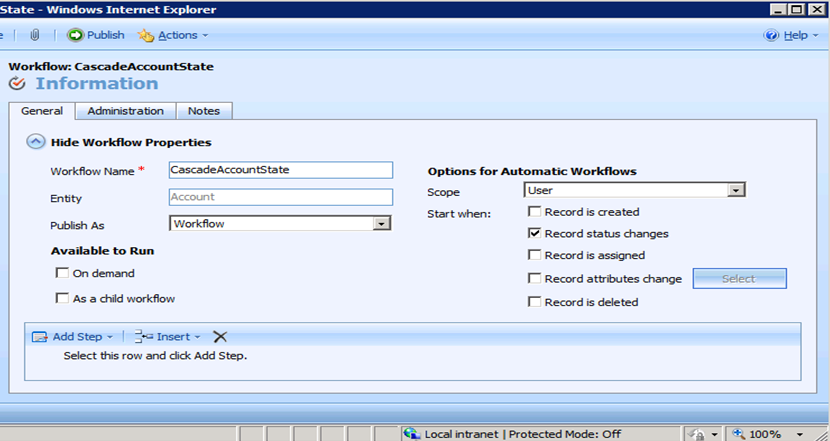
登録後、ワークフローの編集画面から、作成したCascadeStateActivity を使用できるようになります。サンプルでは、親取引先企業の状態を変更したときに、子取引先企業(関連名:account_parent_account)の状態に親取引先企業の状態を伝搬させます。
取引先企業(Account)エンティティに対してワークフローを作成します。ワークフローの起動条件は、下図のように状態次
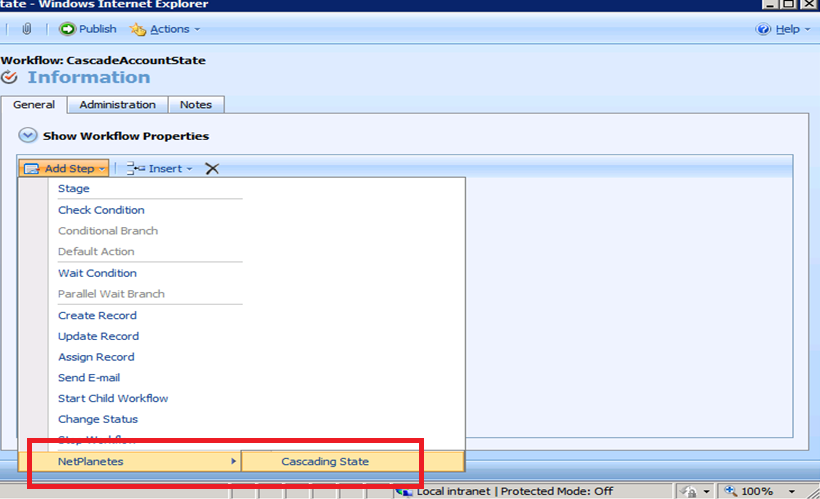
ワークフロー編集画面でステップを追加します。Add Step を選択すると、カスタムアクティビティ用のグループをマウスで選択し、Cascading State を選択します。
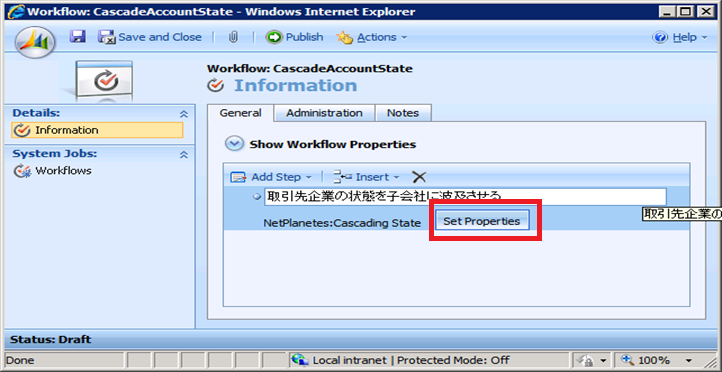
Set Properties ボタンをクリックしてカスタムワークフローアクティビティに値を設定します。
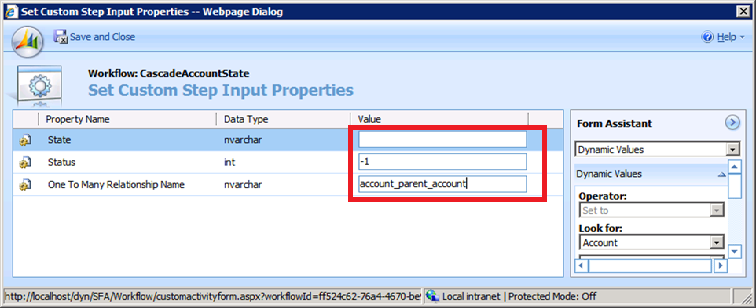
親取引先企業の状態お伝搬させるため、Stateは未指定です。Status はアクティブ、非アクティブ状態の既定値のステータスを設定するため-1のままにします。One to Many Relationsihp Name は、 account_parent_account を指定して、子会社に対して状態が変更されるようにしています。
あとは、ワークフローを保存し、公開します。取引先企業の状態を変更して、子の取引先企業の状態も連動するかを確認します。
3.まとめ
今回は以上です。ワークフローをデバッグする場合は、 CrmAsyncService のプロセスにアタッチして下さい。うまくアタッチできない場合は、[Dynamics CRM] CrmAsyncService にアタッチしようとするとエラーが発生する場合の対処方法 を参照してください。